The SimRush Power is an indoor controller / router for your network.
This model can support up to 3 Outdoor units
It is pre-configured out of the box and managed through the SimRush web portal SPanel. To get online, simply plug in your SimRush Outdoor unit (ODU) as instructed below.
⚠️ This unit is discontinued as a Controller. Replacement unit is the SimRush Power v2
ℹ️ Note that this model does not have built-in WiFi, additional hardware required
Instructions:
Make sure you follow the following steps to get online.
- Connect the ethernet cable to Ethernet Port 5 for ODU1, Ethernet Port 4 for ODU2 and Ethernet Port 3 for ODU3 (far right ports – Highlighted in GREEN)
- Connect the Controller to the power adaptor supplied (24v 2.5a DC)
- Connect your PC to the LAN (Highlighted in ORANGE )
- Ethernet port 2 and SFP
- This model does not have a Wireless card, additional SimRush wireless hardware will automatically connect to the controller and broadcast – Default wireless is “SimRush-xxxxxx” and the Serial number as the password, e.g AABBCC112233 – Serial number is located on the box or back of the controller, all characters before the “/123”
- To make changes to the LAN address or Wireless settings, please visit SPanel:

5. (OPTIONAL) Connect your alternative broadband to utilise the built-in Load-Balancing feature, connect Ethernet Port1 ( Highlighted in RED ) to your alternative broadband network.
ℹ️ Please ensure your alternative broadband router is providing the following network via DHCP:
Gateway: 192.168.1.1 , Subnet: 255.255.255.0
Cable Guide:
Outdoor unit may vary from that of image, but the port to connect the ethernet cable in remains the same.
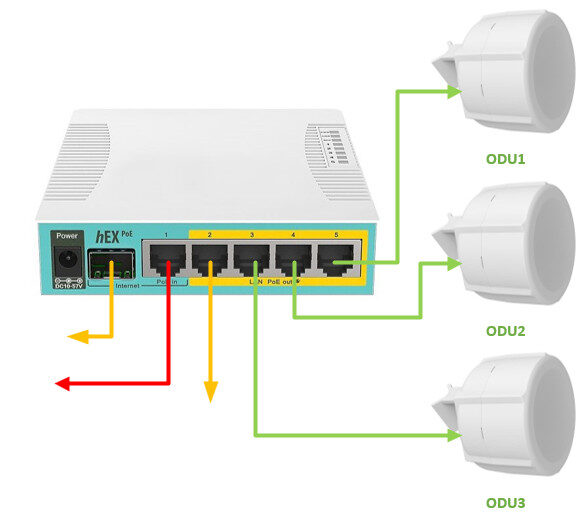
| SimRush Power | |
|---|---|
| Ether1 | AUX1 |
| Ether2 | LAN |
| Ether3 | ODU3 |
| Ether4 | ODU2 |
| Ether5 | ODU1 |
| SFP1 | LAN |
| PSU | 24v 2.5a |
