


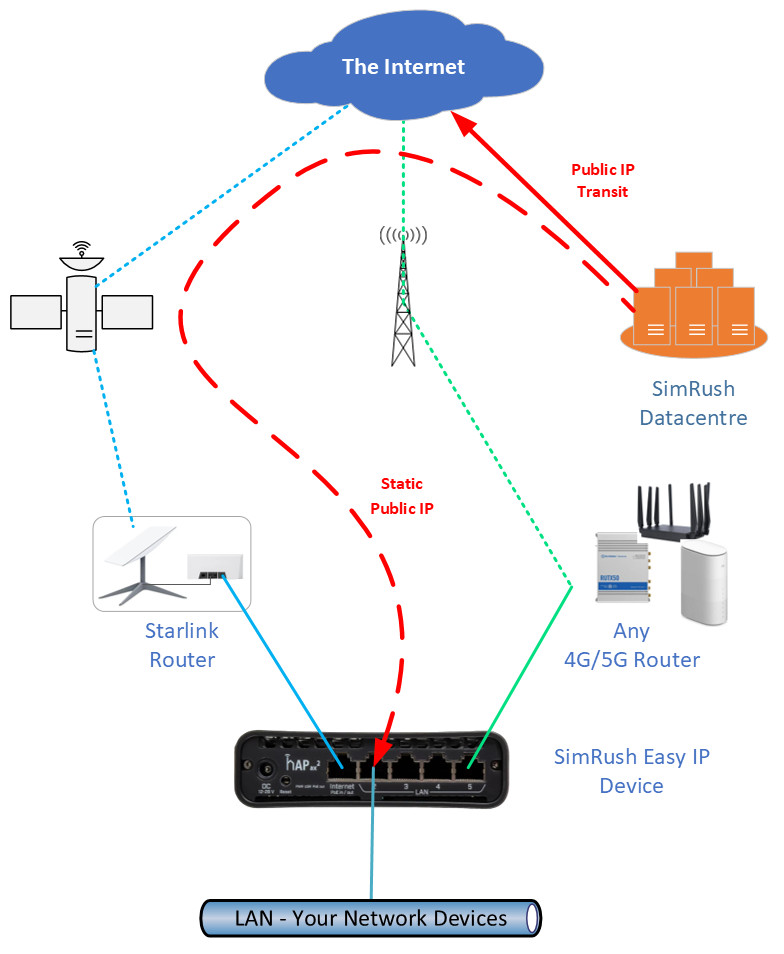
The Starlink Public IP address is dynamic not static.
When Starlink performs a software update then you lose your Starlink IP address and are issued with a new one. This causes issues as anything you have set up with the IP address will not work until you reprogramme it again.
The SimRush Easy IP has a Static Public IP address which is locked to the device. You get complete peace of mind it will never change.
You can move the SimRush device wherever you want and the address will not change.
A SimRush Static Public IP address enables you to remotely access equipment on your network from outside of your premises.
- CCTV equipment
- An email server
- A point-of sale device or EPOS
- Data drives
- A virtual private network (VPN service)
- Remote Desktop Application
- SD-WAN services
- Telemetry
It can also be used to allow for port forwarding, connection monitoring, supporting a VoIP digital phone service or anything else you need it for!
With a wired internet connection you are mostly provided with a public IP address, but this isn’t always static. Most of the time you will be provided with a dynamic IP address.
This is changed on a regular basis by your provider unless you pay to have it fixed and static. This means that every time you think you know the address for your remote access, it’s been changed and you have to find out what your IP address is all over again.
Dynamic DNS services help with this problem on fixed wire services, but they don’t work on 4G access networks. With 4G networks, there is another layer of complexity as the network operator masquerades your 4G connection through various gateways before your access reaches the internet.
This path is not reversible so the information regarding your IP on your equipment is not the same as the rest of the world recognises once it reaches the internet. The mobile network operators also employ firewall services of their own to prevent external access originating from outside of their network reaching your equipment. This means your given IP address is impossible to reach when you rely on a dynamic IP address.
So, when considering static vs dynamic IP – all you need to ask yourself is whether you need to know what your IP address is.
If the answer is yes, the easiest solution is to use a Static IP for your internet service.
Yes you can do this for any auxiliary broadband connection that you connect to your SimRush device.
Please note, for Starlink specifically you will also need to ensure you have a Starlink ethernet adapter, as this doesn’t come as standard on Starlink deployments.
Yes. And if you are using a 4G/ 5G carrier as a back up for your Starlink it will avoid Carrier-grade Network Address Translation (CGNAT) issues and ensure a consistent and high-quality communication experience.
If you want a Static Public IP Address for a single WAN connection then check out the SimRush Easy IP product
Internet Protocol version 4 (IPV4).
The standard assignment is one static public IP address per Easy IP device.
However, it is possible to deliver up to eight if it is necessary for your network requirements. This is a bespoke deployment so please contact us
Yes. It works with any router.
Yes! The IPv4 address is from the Regional /internet registry of RIPE NCC. It can be used anywhere in the world.
The static public IP Address originates from our London based data centre. This means there 200-300ms latency on any non-UK traffic using the IP address.

The Easy IP service is delivered using a Mikrotik Device. If you are based in the UK you can purchase it online from FreeClix
If you live outside of the UK you can purchase a Mikrotik Device in your own country, and simply add the software to manage the device for seamless connectivity.
Get in touch with us for more details.
