The AP One ax2 is part of the new line of WiFi-6 802.11ax access points.
This unit is ideal for indoor spaces which require descression, with the small form factor and rugged metal case, it can be placed in areas where aesthetics is a key factor. The body of the unit acts as a heatsink making this unit fanless.
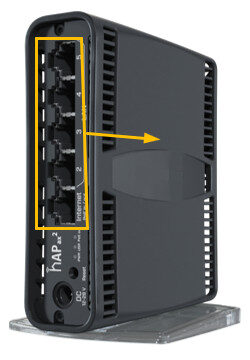
With its inbuilt dual band ax wireless and integrated 5 port switch, this unit can help extend your network to other cabled devices whilst only being fed by 1 cable.
The unit supports 24v passive PoE IN on port 1 giving the unit the ability to be placed anywhere without requiring a power socket nearby.
The unit can be desk or wall mounted, the mounting plate is included.
Instructions:
⚠️The SimRush Access Points are centrally managed by the SimRush Controller and configured via the cloud management platform – SPanel. They are not stand alone wireless access points which requires a controller.
The unit is preconfigured to connect to the SimRush Controller which manages the wireless centrally via SPanel.
- Unbox the access point and follow the cable guide below
- Power the unit via the supplied PSU or via a PoE Switch
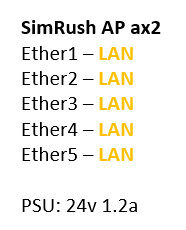
ℹ️ We would recommend using Port 1 as the “Uplink” port which connects back to the SimRush Controller. This port also a PoE-in port and can be powered by a compatible PoE Switch.
Cable Guide: