Brief overview/intro of the hardware and the items required for setup.
What’s required to complete setup:
- 1.2a Power supply
- 3m ethernet cable
- SimRush hardware unit
- XXXXX
Instructions:
The unit is preconfigured to connect to the SimRush Controller which will show its online status via SPanel.
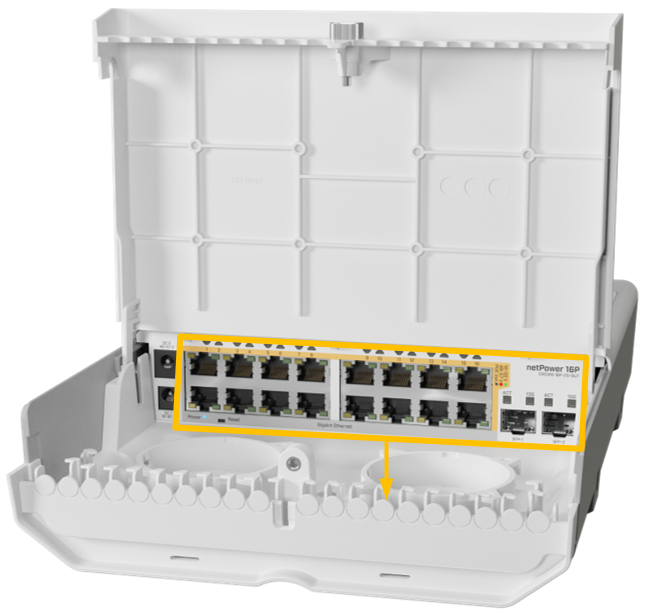
- Unbox the access point and follow the cable guide below.
- Power the unit via the supplied PSU.
- Connect devices to switch as desired.
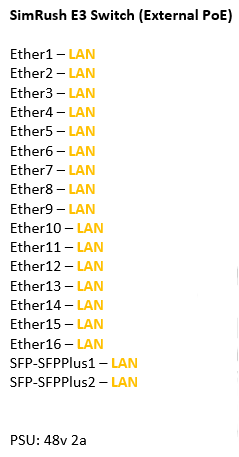
ℹ️ We would recommend using Port 1 as the “Uplink” port which connects back to the SimRush Controller.
Powering:
This unit is powered by 24v DC via a DC power jack, it also supports a secondary DC jack for 48v Input
This unit supports PoE Output of 24v Passive and 48v 802.3af/at (when additional 48v PSU is installed) standards on all 16 ports.
⚠️ This unit does not come supplied with a PSU, additional purchase required.
Recommended power supply requirements:
24v 2.5a 60w
48v 2a 96w
To supply 48v (802.3af/at) to your PoE devices, 48v input is required.
Cable Guide: