The SimRush ODU-5G v1 is the External element to the SimRush System which houses the carrier SIM card and LTE modem.
It is pre-configured out of the box and managed through the SimRush web portal SPanel.
To get online, simply plug in your SimRush Outdoor unit (ODU) into your SimRush Controller (IDU) as instructed below.
⚠️ This unit is no longer being shipped see SimRush ODU-5G v2 as replacement
Instructions:
Use the following steps to access the Outdoor unit to make changes to check SIM/Carrier status information:
- Disassemble the cable gland and feed ethernet cable through to connect it to the ethernet port of the ODU-5G unit.
- Ensure once cable is clicked in, the cable gland is screwed back in with the rubber seal around the cable and tightened hand tight.
- Attach mounting bracket to Pole using the supplied U-Bolts or alternatively affix the mounting plate to a flat wall surface.
- Plug the ethernet cable either into the Controller (if the controller supports 48v – See Controller Guides) or plug into the supplied PoE Injector onto the WAN / PoE side of the injector, then plug the LAN side of the injector into the controller.
- Using a Browser, browse to http://172.16.1.1/
- Login details are, Username: installer , Password: SimRush5g
- Once you are logged in, the main status page will show you the current details of the system along with signal.
- You can browse to the right side menu (3 horizontal “burger” lines) and select System Monitor then Cellular WAN Status to check signal levels
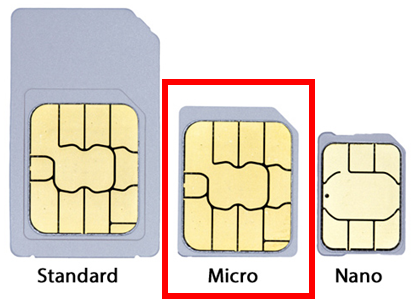
- If you need to change the SIM card Carefully unscrew the clear hatch at the bottom of the ODU-5G unit
- The default slot is Slot 1 on the RIGHT side of the unit closest to the edge.
- ⚠️ Note that the screws are not captive and will fall out if the unit is already mounted.
- The default slot is Slot 1 on the RIGHT side of the unit closest to the edge.
- Further information about the Outdoor unit settings can be found on the SimRush FAQ’s section of the SimRush website: SimRush: General FAQs | SimRush
Cable Guide:
Outdoor unit may vary from that of image, but port to put the ethernet cable in remains the same
SimRush ODU 5G v1 SIM Slot
SimRush ODU 5G v1 SIM card size